



Managing customer issues across distributed teams can feel like juggling too many moving parts at once. Without a system in place, requests get lost, priorities blur, and accountability slips, especially when working with international staff from places like Canada, Germany, or Australia. A support ticket system brings order to this chaos, giving IT managers a central hub for tracking, categorizing, and resolving every user request efficiently. Learn how adopting structured ticket management can transform your support operation into a reliable, transparent, and high-performing service.
Defining Support Tickets in IT Service
A support ticket (also called a trouble ticket) is a formal record that documents a user’s request or issue submitted to your IT help desk or support team. Think of it as a digital case file that follows a problem from the moment someone reports it until the moment it’s resolved. The ticket captures essential details like the nature of the problem, priority level, contact information, and a complete history of all interactions between the user and your support team. This centralized documentation becomes your single source of truth for tracking what happened, who handled it, and how long resolution took.
In practice, support tickets serve as the backbone of IT service management. When a team member encounters a system outage, software issue, or hardware problem, they submit a ticket through your help desk portal or by contacting support directly. Your ticketing system assigns a unique identifier to that request, routes it to the appropriate technical staff member, and maintains a complete audit trail throughout the resolution process. This creates accountability at every stage. Your team knows who owns each issue, what steps have been taken, what the current status is, and whether the resolution meets the user’s expectations. Without this structure, requests get lost in email threads, duplicate efforts happen, and critical issues fall through the cracks.

What makes tickets different from ad hoc support requests is their systematic nature. Ticketing systems organize and prioritize incoming requests based on urgency and impact. A critical system outage affecting fifty employees gets handled differently than a single user’s printer connectivity issue. The system also enables performance tracking, so you can measure metrics like average resolution time, first contact resolution rate, and customer satisfaction. For IT managers overseeing distributed teams or outsourced support providers, tickets create transparency and measurable accountability. You can see exactly how your support operation performs.
Pro tip: Implement a clear ticket categorization system from day one, organizing issues by department, system, or problem type. This allows your team to route tickets faster and helps you identify patterns in recurring problems that might benefit from preventive solutions.
Types of Support Tickets and Key Differences
Not all support tickets are created equal. Your IT team handles drastically different situations depending on the ticket type, and treating them all the same way will leave critical issues unresolved while wasting resources on routine requests. The main ticket types you’ll encounter are incident tickets, service requests, and problem tickets, each with distinct workflows and resolution timelines.
Incident tickets represent unplanned interruptions to your services. A server goes down, email stops working across your organization, or a critical application crashes. These demand immediate attention because they directly impact business operations. An incident affecting fifty employees requires a different response protocol than a single user’s software issue. Your ticketing system should flag these as high priority, route them to senior technicians, and trigger escalation procedures if response time targets aren’t met. Resolution is the primary goal, even if it’s a temporary fix to get operations running again. Service requests take a different approach. These are planned, predictable asks like provisioning new user accounts, requesting software licenses, or asking for information. They follow standard fulfillment processes rather than emergency response. A new hire needs a laptop and email account, but that’s scheduled work, not a crisis. These tickets can often be handled through automation or junior support staff. Problem tickets dig deeper into recurring or complex issues. If users keep reporting the same printer error or a particular system keeps crashing, your team needs to investigate the root cause rather than just fix the immediate symptom. These tickets may take longer to resolve but prevent future incidents.
Here’s how these types differ in practice:
- Incident tickets: Urgent, unplanned, immediate impact on operations, require escalation paths
- Service requests: Scheduled, predictable, standard workflows, can be partially automated
- Problem tickets: Investigative, focus on prevention, may require vendor involvement or system updates
Understanding these differences matters for your outsourced or remote teams too. When you’re managing support staff across time zones, clearly labeling ticket types prevents confusion about response expectations. A remote team member in another country should immediately recognize whether a ticket needs urgent action or follows a standard process. Your ticketing system’s categorization directly impacts how quickly your team responds and how effectively they resolve issues.
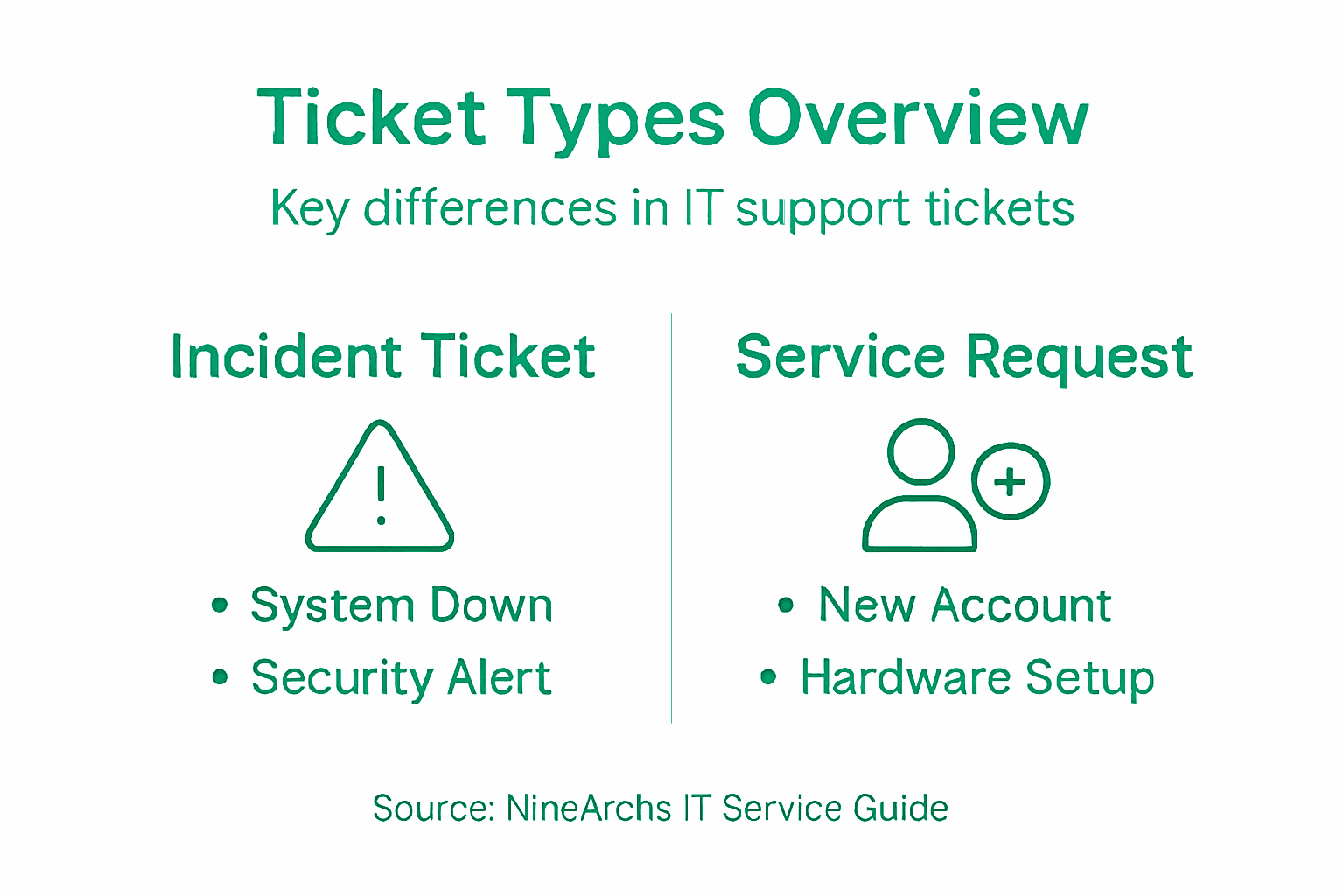
Here’s a quick comparison of the main IT support ticket types and their impact:
| Ticket Type | Typical Scenario | Best Handled By | Business Impact |
|---|---|---|---|
| Incident | Unplanned outage or service disruption | Senior technicians | Prevents operational downtime |
| Service Request | New account setup or access request | Junior staff or automation | Supports routine business needs |
| Problem | Repeated system errors or glitches | Troubleshooting specialists | Enhances long-term reliability |
Pro tip: Create automated routing rules in your ticketing system that assign incident tickets to your most experienced staff, service requests to specialized provisioning queues, and problem tickets to a dedicated troubleshooting team. This ensures each ticket type gets handled by people trained for that specific workflow.
How Ticketing Systems Manage Issues Efficiently
A ticketing system transforms support from reactive chaos into a predictable, measurable operation. Without one, your team responds to whoever yells the loudest, critical issues get buried in email threads, and you have no idea whether your support operation is improving or deteriorating. A good ticketing system automates the work that doesn’t require human judgment and focuses your team’s attention where it actually matters.
The system handles this through a structured lifecycle. When a user submits a request through email, a web portal, or even chat, the ticketing system captures it and assigns a unique identifier. From there, automated rules take over. The system categorizes the ticket based on keywords or the channel it came through. It prioritizes based on urgency and impact. A ticket reporting that the entire sales department’s database is offline gets flagged differently than a request for a password reset. The system then routes the ticket to the right team or individual based on expertise and current workload. Your infrastructure specialist doesn’t waste time on printer issues, and your help desk staff doesn’t get stuck troubleshooting complex server problems. This routing happens automatically, in seconds, eliminating the back and forth emails asking “who should handle this?”
Throughout the ticket lifecycle, the system maintains a complete audit trail. Every interaction gets time stamped and documented. Your team members can see exactly what happened, in what order, with no confusion about who said what or when. This transparency matters enormously when managing outsourced or remote support teams. You can review the exact steps taken, verify that procedures were followed correctly, and identify where training is needed. The system also enforces Service Level Agreements (SLAs), which define response and resolution time targets. If an incident ticket isn’t acknowledged within 30 minutes, the system flags it for escalation. If a service request isn’t closed within two business days, you get an alert. This keeps everyone accountable and prevents issues from slipping through the cracks.
Real time reporting gives you visibility into performance. You can measure metrics like average resolution time, first contact resolution rate (issues fixed without requiring follow up), and customer satisfaction scores. These metrics help you identify bottlenecks. If incident tickets are taking too long to resolve, you might need to hire more senior staff or invest in better monitoring tools. If service requests are backing up, you might automate more of that workflow. For IT managers running distributed teams, this data becomes your management tool. You’re not guessing whether your operation is effective; you have concrete numbers.
Pro tip: Set up automated ticket escalation rules based on ticket age and priority level, and configure your system to send reminders to team members when tickets approach SLA deadlines. This prevents tickets from aging silently and ensures accountability without requiring manual oversight.
Benefits for IT Teams and Business Operations
Support tickets transform how IT teams operate and directly impact your bottom line. When you implement a proper ticketing system, your team stops fighting fires and starts working strategically. The benefits ripple across every part of your organization, from the help desk handling day to day requests to executive leadership measuring operational performance.
For your IT team, the advantages are immediate and measurable. Centralized issue tracking means no more hunting through email threads to figure out what happened to a user’s request. Every detail lives in one place. Your team members can see the complete history, know exactly who owns each ticket, and understand the current status without asking a dozen clarifying questions. This eliminates duplicate work. When multiple technicians don’t realize the same issue is already being handled, you waste resources and confuse users. Tickets prevent this by creating a single source of truth. Reduced resolution times follow naturally from better organization. When tickets route automatically to specialists, when your team can see priorities clearly, and when nothing gets lost in the shuffle, issues get resolved faster. Your infrastructure specialist focuses on server problems instead of wasting hours on unrelated tasks. Your help desk staff handles routine requests they’re trained for instead of getting bogged down in complex troubleshooting. Response times improve because the system surfaces urgent tickets immediately and escalates them when time targets are at risk.
Accountability and transparency matter especially when you’re managing outsourced or remote support teams. Every interaction gets documented with timestamps. You can verify that procedures were followed, that staff members responded promptly, and that issues received appropriate attention. This builds trust with your team and gives you concrete data if performance problems arise. For business operations overall, ticketing systems deliver measurable impact. Reduced downtime means your organization stays productive. When critical systems go down, faster resolution times mean fewer lost revenue hours. Employees experience fewer interruptions, so they focus on revenue generating work instead of troubleshooting technology. Higher customer satisfaction follows when IT support responds predictably and resolves issues consistently. Users know that when they submit a ticket, someone will respond on schedule, investigate thoroughly, and communicate progress. Strong IT support builds confidence in your technology infrastructure and strengthens your reputation.
Analytics and reporting give you the data you need to optimize operations. You can measure metrics across your entire support operation, identify bottlenecks, and make informed decisions about staffing, training, or process improvements. This data driven approach transforms support from a cost center into a managed, optimized function that directly contributes to business success.
Below is a summary of how ticketing systems boost IT operations efficiency:
| Feature | Operational Benefit | Business Outcome |
|---|---|---|
| Centralized tracking | Reduces duplicate efforts | Faster issue resolution |
| Automated routing | Assigns tickets efficiently | Maximizes specialist productivity |
| SLA enforcement | Maintains response timelines | Improves customer satisfaction |
| Performance analytics | Identifies bottlenecks | Enables data-driven decisions |
Pro tip: Track and report on ticket metrics monthly, highlighting which issue categories take longest to resolve and which teams consistently meet SLA targets. Use this data to identify training opportunities and celebrate high performing team members, which reinforces accountability and continuous improvement across your support operation.
Common Challenges and Pitfalls to Avoid
Implementing a ticketing system solves many problems, but it introduces new ones if you’re not careful. The technology itself doesn’t guarantee success. I’ve seen organizations deploy ticketing systems and end up with worse customer experiences than before because they treated tickets as transactions instead of conversations. Your team can follow all the technical procedures perfectly and still fail to actually help users if you lose sight of the human side.
One major pitfall is poor ticket classification and prioritization. When tickets don’t get categorized correctly, urgent issues end up in the routine queue and get delayed. A critical system outage somehow gets labeled as a general inquiry. Meanwhile, low priority requests get treated as emergencies, and your team wastes resources on the wrong problems. This happens because classification rules aren’t clearly defined or staff members don’t follow them consistently. The solution requires standardized classification schemes that everyone understands and enforces. But here’s the catch: overly rigid systems create another problem. When your ticketing system forces every interaction into strict categories and automated responses, users feel like they’re talking to a robot instead of getting genuine help. Support becomes impersonal. Users get frustrated because the system doesn’t account for nuance in their situation. You need to balance automation with human judgment. Your system should handle routine, straightforward requests automatically, but escalate complex issues to people who can actually think through the problem.
Overwhelming ticket volume without proper staffing or scalability causes chaos. As your organization grows, ticket volume increases, but if your team size doesn’t grow proportionally and your system can’t handle the load, tickets back up. Response times slip. Frustration builds. Users start resubmitting tickets because they think theirs got lost, which creates duplicate entries and makes the problem worse. The fix involves planning for scale before you hit the breaking point. If you’re managing outsourced teams, this matters even more. A team in another time zone can’t suddenly process triple the volume just because you ask them to.
Poor system integration creates another headache. Your ticketing system lives isolated from your other tools. Users submit tickets, but their information doesn’t automatically flow into your knowledge base, monitoring systems, or asset management tools. Your team manually enters the same data multiple times. This introduces errors and wastes time. The solution requires choosing a ticketing platform that integrates with your existing technology stack and investing time to set those integrations up correctly.
Pro tip: Audit your ticket classification scheme quarterly by reviewing a sample of closed tickets to identify common misclassifications, then retrain your team on problematic categories. This prevents classification drift and keeps your system effective as your business evolves.
Streamline Your IT Support with Expert Outsourcing Solutions
Managing support tickets effectively is essential to prevent lost requests, slow response times, and operational downtime. If you have struggled with incorrect ticket classification, overwhelming volumes, or delayed escalations, you are not alone. The key lies in combining systematic ticket management with scalable remote workforce solutions that relieve internal pressures and boost IT service efficiency.
NineArchs LLC specializes in providing tailored outsourcing services such as virtual assistance, custom software development, and skills outsourcing to optimize your IT support workflows. By partnering with us, you gain access to experienced professionals who understand incident, service request, and problem ticket workflows and ensure rapid, accountable ticket resolution. Don’t let ticket overload or backlogs hold your business back. Take control with reliable, cost-efficient support that scales with your needs. Contact us today at NineArchs Contact and discover how our remote workforce solutions can transform your IT operations and accelerate growth.
Explore how our knowledge outsourcing and business process outsourcing services align with your goals in IT service management by visiting our contact page. Start turning your support ticket challenges into growth opportunities now.
Frequently Asked Questions
What is a support ticket?
A support ticket is a formal record that documents a user’s request or issue submitted to an IT help desk or support team, capturing details like the nature of the problem, priority level, and a history of interactions.
Why are support tickets important for IT teams?
Support tickets provide a structured way to manage issues, track performance, and enhance accountability, ensuring that critical problems are prioritized and addressed efficiently.
What are the different types of support tickets?
The main types of support tickets are incident tickets (for unplanned interruptions), service requests (for planned asks like account setups), and problem tickets (focusing on recurring issues). Each has its own workflow and resolution timeline.
How can a ticketing system improve business operations?
A ticketing system centralizes issue tracking, automates routing, enforces SLAs, and provides analytics, which helps reduce resolution times and enhances customer satisfaction while optimizing resource allocation.